One card, several shoot days
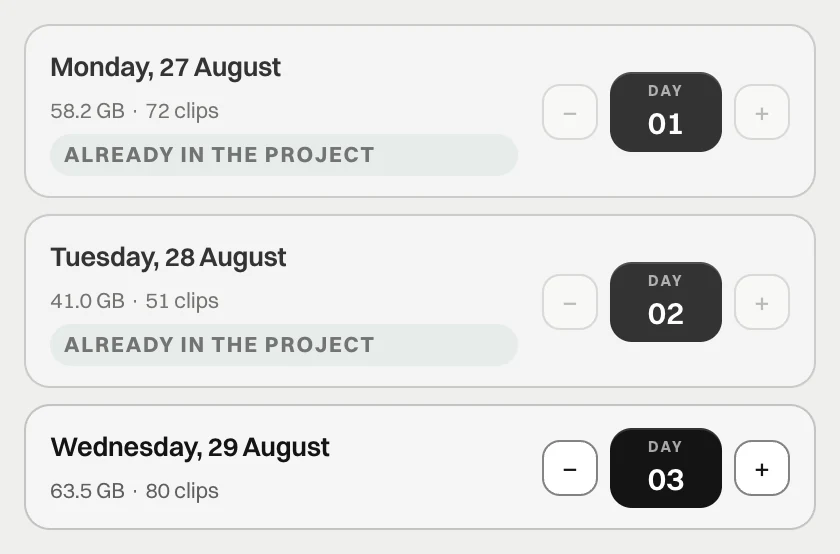
Yesterday's footage is still on the card. Today you added more takes. Plug in the reader and you see one card, but the project needs two shooting days. Separating the folders by hand starts with a question: where does one day actually end?
flow reads the recording dates and shows the days before copying. You can see which ones are already in the project and which ones will be added. You do not have to work that out from a sequence of filenames.
The card's date is a starting point
When the camera clock is correct, footage is assigned to the day recorded in the files. One card can contain several days. flow can separate them while keeping each clip together with its XML file.
If the shoot crossed midnight, review the proposed split. A calendar date comes from a file; organising a shooting day is a project decision. The view before import lets you spot that situation before the footage reaches its folders.
You can correct a wrong clock
A camera with the wrong clock records the wrong date. Software cannot infer the real shoot date from that value alone. That is why flow lets you correct the date before copying.
The correction assigns the footage to the right day in the project. It does not require formatting the card or moving the originals by hand. The source media remains read-only.
Check the destination project too
One card can hold footage for two clients. A day recognised as already copied to another project is visible and unchecked by default. Review the selection at this point instead of adding the whole card automatically.
Before pressing Start, check three things: the project, the days and the destination drive. flow builds folders from your preset, so you do not have to create them again each time. A useful preset saves repeated clicks. Checking the assignment keeps an organised folder structure from ending up in the wrong project.